

Mitsubishi CN105 Climate
The mitsubishi_cn105 component allows communication with Mitsubishi Electric indoor units using the CN105 connector.
The component communicates with the unit over UART and provides control and state reporting.
Hardware Connection
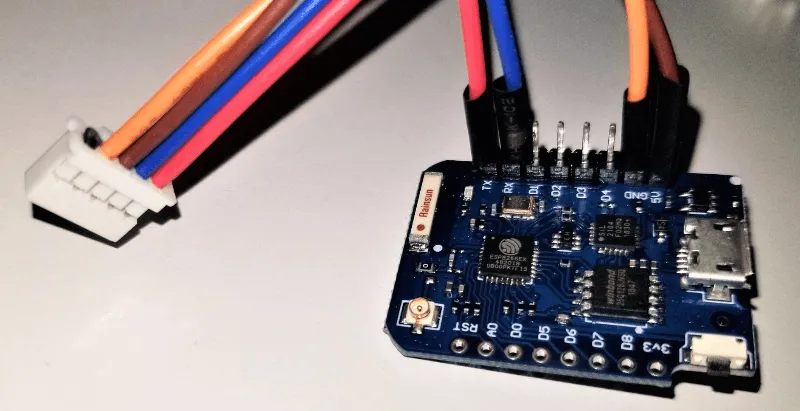
Section titled “Hardware Connection”The CN105 connector exposes power and UART communication lines.
CN105 pinout
Section titled “CN105 pinout”| Pin | Function | Wire color | Device |
|---|---|---|---|
| 1 | NC | ||
| 2 | GND | orange | GND |
| 3 | 5V | brown | 5V |
| 4 | TX | blue | RX |
| 5 | RX | red | TX |
WARNING
Verify the pinout and voltage levels before connecting.
This component requires a UART bus configured with:
- 8 data bits
- EVEN parity
- 1 stop bit
- Baud rate
2400or9600
NOTE
The required baud rate depends on the indoor unit. During initial setup, try both supported values if communication does not work.
Example configuration
Section titled “Example configuration”uart: id: ac_uart tx_pin: GPIO1 rx_pin: GPIO3 data_bits: 8 baud_rate: 2400 parity: EVEN stop_bits: 1
climate: - platform: mitsubishi_cn105 name: "Living Room AC" uart_id: ac_uart update_interval: 1s current_temperature_min_interval: 60sWARNING
If you are using the Logger Component, make sure you are not using the same pins, or disable UART logging with:
logger: baud_rate: 0Supported features
Section titled “Supported features”- Target temperature range:
16 °Cto31 °C - Current temperature reporting
- Modes:
OFF,AUTO,HEAT,COOL,DRY,FAN_ONLY - Fan modes:
AUTO,QUIET,LOW,MEDIUM,MIDDLE,HIGH
NOTE
Fan modes map to the following Mitsubishi fan speeds:
AUTO→AUTOQUIET→QUIETLOW→SPEED 1MEDIUM→SPEED 2MIDDLE→SPEED 3HIGH→SPEED 4
Configuration variables
Section titled “Configuration variables”-
uart_id (Optional, ID): The UART bus to use.
-
update_interval (Optional, Time): Interval between status updates. Defaults to
1s. Lower values provide faster detection of external changes, for example when using the remote control. -
current_temperature_min_interval (Optional, Time): Minimum time between consecutive room temperature reads.
This allows keeping a low
update_interval(to quickly reflect changes, e.g. when using an IR remote) while avoiding excessive current temperature updates.Room temperature is still requested during regular polling cycles, so the effective update frequency is bounded by
update_interval.Set to
neverto disable room temperature polling.Defaults to
60s. -
All other options from Climate.
Lambda calls
Section titled “Lambda calls”The following methods can be used from lambdas for advanced integrations:
-
set_remote_temperature(float temperature)- Sends an external (remote) room temperature to the indoor unit.
- Overrides the unit’s internal temperature sensor.
- Values outside the supported range (
8.0–39.5 °C) orNaNare ignored.
-
clear_remote_temperature()- Clears the externally provided temperature.
- Restores use of the unit’s internal temperature sensor.
NOTE
This does not modify the temperature reported by the A/C unit in its status/room temperature packets. The reported current temperature remains the value provided by the unit itself. Some units may reflect the externally provided temperature, while others may continue to report their internal sensor value.
Some units may automatically fall back to the internal sensor if no external temperature is sent.
In such cases, the external temperature should be sent periodically (e.g. using an interval).
Alternatively, clear_remote_temperature() can be called if the external sensor becomes unavailable for an extended period.
It is the user’s responsibility to tailor the update strategy and usage to their specific A/C unit and setup.
This is an advanced feature; users are expected to understand the implications of overriding the internal sensor. Depending on the unit, it may be necessary to explicitly call clear_remote_temperature() to restore normal operation. Improper use may lead to unexpected behavior.
Example:
climate:  - platform: mitsubishi_cn105    id: ac    # ...
sensor:  - platform: homeassistant    id: living_room_temp    entity_id: sensor.living_room_temperature    on_value:      then:        - lambda: |-            id(ac).set_remote_temperature(x);